How to Reorder Your Instagram Grid: Step-by-Step + Every Instagram Feature Louisiana Businesses Should Be Using
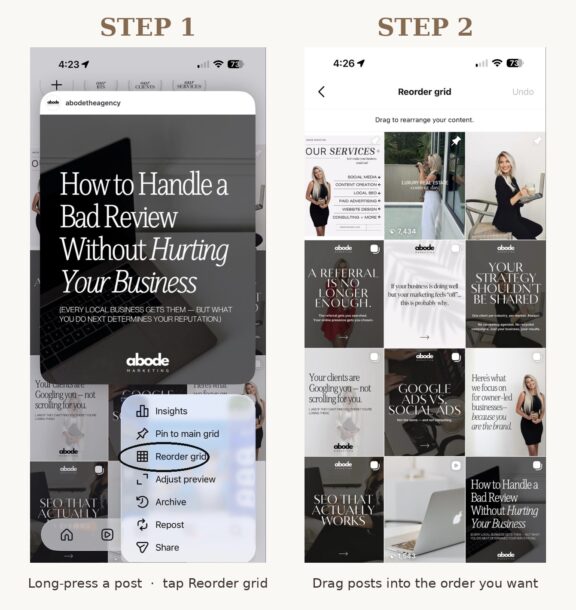
Open Instagram on your phone, hold down on one of your posts, and you’ll see an option called Reorder grid. That single button lets you drag any post on your profile into any position you want — even posts you published years ago. For Louisiana small businesses, that changes how your profile sells you in the two seconds it takes a prospect to decide whether you’re worth a follow.
I manage Instagram for law firms, medical practices, contractors, and insurance agencies across Louisiana, and I see the same thing on almost every profile: the first nine squares are random. A holiday post next to a service photo next to a meme. Reorder grid solves that. Here’s how to use it, and how to use it strategically.
Can I Reorder My Instagram Grid?
Yes. Every Instagram user can rearrange the posts on their profile grid using the Reorder grid feature. It works on personal, Creator, and Business accounts. The feature is mobile-only — there is no desktop version. Posts going back as far as ten years can be moved into any position. Up to three pinned posts will stay locked at the top, but everything below them is drag-and-drop.
How Do I Rearrange Posts on My Instagram Profile?
The process is genuinely easy. Open Instagram on your phone and follow these five steps:
- Open your profile and tap the Posts tab (the grid icon).
- Press and hold any post until a menu pops up.
- Select Reorder grid from the menu. Your grid becomes editable.
- Drag any post to the position you want it in. You can rearrange every post you have ever published.
- Tap Next in the top right to save, or Undo if you change your mind.
There is no limit on how many times you can reorder. Move things around as often as you want, with no penalty.
Why Can’t I Reorder My Instagram Grid?
If you don’t see Reorder grid when you long-press a post, three things to check. First, make sure your Instagram app is updated to the latest version through the App Store or Google Play. Second, fully close and reopen the app — sometimes the new menu doesn’t load until the app restarts. Third, the feature is mobile only. You won’t find it on Instagram on a web browser.
Does Reordering My Instagram Grid Hurt Engagement?
No. This is the question I get most from clients, and the answer matters. Reordering changes only the visual position of a post on your profile grid. All likes, comments, shares, saves, and the original publish date are kept intact. The post is not republished and the algorithm does not penalize the move — a point Instagram’s creator team has reinforced in its communications. You are essentially redecorating your profile, not deleting and reposting.
Can Businesses Reorder Their Instagram Grid?
Yes, and businesses should be the most aggressive users of this feature. For more than a decade, business profiles on Instagram worked one way: posts appeared in publication order. If your best client testimonial landed the same week as a few behind-the-scenes photos and a holiday post, your testimonial got buried in row three. The only fix was to delete posts (losing all the engagement) or pin them, which limited you to three.
Now the first nine squares a prospective client sees when they land on your profile are entirely your choice. That is the equivalent of being able to redesign your website homepage on the fly, except your Instagram profile is often the first impression a Louisiana customer gets — especially in service industries where people verify you exist on socials before they ever click your website. Our content and social services are built around exactly this kind of profile-as-asset thinking, but the grid reorder feature gives every business owner a free tool to clean up their first impression today.
How Should I Reorder My Grid Strategically?
Most people will log in and start moving posts based on what looks pretty. That’s a mistake. Your grid is a sales tool. Here is the strategic order I recommend to every Abode Marketing client.
Top Row (Posts 1-3): Proof and Credibility
Put your three strongest posts here. For a Lafayette personal injury attorney, that might be a case result graphic, a client testimonial, and a community involvement post. For a Prairieville contractor, it would be a finished-build photo, a five-star Google review screenshot, and a recognizable local project. These three slots do more for trust than your bio ever will.
Middle Rows: Personality and Expertise
This is where your educational content, behind-the-scenes shots, and team posts go. You want to show that you are human, not a logo. People hire people, especially in Louisiana where word-of-mouth still drives most professional service decisions.
Bottom Rows: Older Content That Still Matters
Push less relevant or off-brand older posts to the bottom of your grid. Or archive them. Archiving keeps the post in your account history without showing it on your grid, and there is no penalty for archiving.
Other Instagram Features Louisiana Businesses Should Be Using
Grid Reordering is not the only feature worth your attention. A handful of other changes directly affect how Louisiana small businesses get discovered on the platform. I track these so my clients don’t have to, but here are the ones reshaping strategy right now.
Carousel Reordering
You can now long-press a slide inside an already-published carousel and drag it to a new position without losing any likes, comments, or shares. The only catch is you still cannot add a new slide after publishing — you can only reorder or delete what is already there.
Original Content Protections Now Cover Photos and Carousels
Instagram’s original-content rules now go beyond Reels to cover photos and carousels. Accounts that primarily repost content they did not create are no longer recommended in Explore, the Feed, or Discover. If your strategy was sharing other people’s content, that strategy is dead. Original content wins now.
Creator Tools Opened to All Public Accounts
Every public Instagram account now has access to the insights dashboard, scheduling out multiple weeks, and trending audio for Reels. You no longer have to switch to a Business or Creator account to use the basic tools. This levels the playing field for any Louisiana business that has been hesitating to switch account types.
In-App Teleprompter
Instagram pulled the teleprompter feature into the main camera. Upload a script, set the scroll speed, and record without breaking eye contact. This single feature has cut my clients’ Reels production time in half.
SEO Keywords Now Outweigh Hashtags
This is the change most small businesses are missing. Instagram no longer rewards hashtag stacking. What ranks now is keywords inside your captions, your profile bio, and your alt text — mirroring how Google’s own SEO starter guide describes search-friendly content. Treat every caption like a mini blog post. If you run a Baton Rouge law firm, the phrase “Baton Rouge personal injury attorney” inside your captions will do more for discovery than 30 hashtags ever will. This is the same kind of search-first thinking I apply to local SEO for Louisiana businesses.
The Bigger Picture: Your Profile Is the New Homepage
Between Grid Reordering, the SEO-first algorithm changes, and the death of hashtag-driven reach, Instagram is acting more like a search engine than a social network. Industry coverage from Search Engine Land and Social Media Today has tracked the same pattern across all major platforms. People search the platform like they search Google, they land on your profile, and they make a decision in roughly two seconds. The first nine squares on your grid are the deciding factor.
Want a second set of eyes on your profile?
If you have never thought about your Instagram grid as a sales asset, today is the day to start. Take 20 minutes, reorder your top nine, and watch what happens to profile-to-follow conversion over the next 30 days. If you want a professional review of your full digital footprint — your website, Google Business Profile, and social profiles working together — book a free visibility audit with Abode Marketing. We pull every signal Google and Instagram see about your business, show you what is helping and what is hurting, and give you a 30-day plan to fix it. Or call us directly at (337) 270-5011.
Features like Grid Reordering only stay an advantage for businesses who actually use them. Reorder your grid today.
Frequently asked questions
Does reordering my Instagram grid delete my likes or comments?
No. Reorder grid changes only the visual position of a post on your profile. Every like, comment, share, save, and the original publish date stays intact — the post is not republished. You are redecorating your profile, not deleting and reposting.
Can I reorder my Instagram grid on a computer?
No. Reorder grid is mobile-only — there is no desktop version. If you do not see the option, update the Instagram app to the latest version and fully close and reopen it, since the menu sometimes does not load until the app restarts.
How often should a Louisiana business reorder its Instagram grid?
There is no limit and no penalty, so treat it like a living storefront. A practical rhythm is to refresh your top nine whenever you earn a strong new proof point — a five-star review screenshot, a case result, a finished project — and to do a quick seasonal check every quarter so the first impression always leads with credibility.
Will reordering my grid hurt my reach or trigger the algorithm?
No. Instagram’s creator team has been clear that moving a post’s position does not republish it or affect its reach. What actually drives discovery now is keywords in your captions, bio, and alt text — not hashtag stacking — so pair a clean grid with search-friendly captions for the biggest gain.

You Might Also Like